Configure Notifications
Open Gateway (OG) sends notifications to Consumers by email. The supported email service is:
This guide explains how to set up SendGrid and produce the configuration items Open Gateway needs.
CDR notification requirements
Legislation: Competition and Consumer (Consumer Data Right) Rules 2020
- Compilation No. 10
- Compilation date: 4 March 2025
- Includes amendments up to: Competition and Consumer (Consumer Data Right) Amendment (2025 Measures No. 1) Rules 2025
- Authorised Version F2025C00572, registered 18 June 2025
The CDR requirements are:
- create, amend and withdraw notifications, as set out in rule 4.18 CDR receipts
- consent expiry notifications, as set out in rule 4.18A Notification of CDR consumer if Collection Consent expires
- ongoing notifications, as set out in rule 4.20 Ongoing notification requirement—current consents
Overview
To set up the SendGrid integration with OG, complete all the steps below. Then send the resulting details to Biza through your onboarding channel, so Biza can apply them to your Open Gateway instance.
Instance configuration
This exercise produces the following configuration items. Biza sets them on your Open Gateway instance.
| Configuration item | Key | Required | Description |
|---|---|---|---|
| SendGrid API key | sendgrid_api_key | Optional | The SendGrid API key with Mail Send access. It is a property in your space's AWS Secrets Manager secret, not a chart value. OG starts without it, but every notification fails until the key is set. Once it is set, OG sends email again without a restart. |
| From address | sendgrid.fromAddress | Required | The email address that emails are sent from (for example, cdr@examplerecipient.com). Consumers see it when they view the email, so consider how Consumers will use this address. |
| From name | sendgrid.fromName | Optional | A name or title shown with the from address (for example, Example Company). |
| Notification time zone | sendgrid.notificationTimeZone | Required | The time zone for dates and times in notifications. OG converts event dates and times to this time zone before sending them to SendGrid in the email payload. OG accepts any IANA time zone name, for example Australia/Brisbane, Australia/Sydney or Australia/Melbourne. |
| CDR policy URI | sendgrid.cdrPolicyUri | Required | The address of your CDR policy. OG passes it to every template as cdrPolicyUrl. |
| Consent Started template ID | sendgrid.templateIds.<brand>.COLLECTION_START | Required | The template ID for the Consent Started event. |
| Consent Amended template ID | sendgrid.templateIds.<brand>.COLLECTION_AMEND | Required | The template ID for the Consent Amended event. |
| Consent Withdrawn template ID | sendgrid.templateIds.<brand>.COLLECTION_WITHDRAW | Required | The template ID for the Consent Withdrawn event. |
| Consent Expired template ID | sendgrid.templateIds.<brand>.COLLECTION_EXPIRE | Required | The template ID for the Consent Expired event. |
| Consent Ongoing Reminder template ID | sendgrid.templateIds.<brand>.CONSENT_REMINDER | Required | The template ID for the Consent Ongoing Reminder event. |
<brand> names a set of template IDs. A default set holding all five template IDs is required. If you have more than one Software Product, you can also supply a set whose key is a Software Product's ID. OG uses that set's template for an event when one is set, and the default template otherwise.
Check that SendGrid domain authentication is configured for the from address domain. Without it, emails are more likely to be filtered as spam. Check this in the Sender Authentication section of the SendGrid console: there should be a verified entry under Domain Authentication for the domain.
If domain authentication is not yet set up, setting it up is a specialised task that needs your DNS administrator. See How to set up domain authentication.
SendGrid API key
Access to the SendGrid APIs is controlled by an API key. When you have created the key, share it with Biza so OG can call the API to send emails. We recommend you create two keys: one for production (Red) and one for non-production (Yellow).
Steps:
- Follow Creating an API key.
- Select Restricted Access, then expand
Mail Sendand setMail Sendto Full Access. - Save the API key and send it to Biza through your usual onboarding channel. The key is secret material: transfer it with care.
Templates
SendGrid templates let you control email branding separately from OG. You can change the active version of a template without changing its template ID, so you can upgrade a template, or roll back to a previous version if you find an issue.
For each event type, OG sends a specific JSON payload to the SendGrid Mail Send API as dynamic template data. The following sections describe the JSON payload for each event and give a sample template.
See Design a dynamic template.
To find a template ID, expand the template in the dynamic template list. Copy each template ID into the matching template ID item in your OG configuration. You can customise the subject as required.
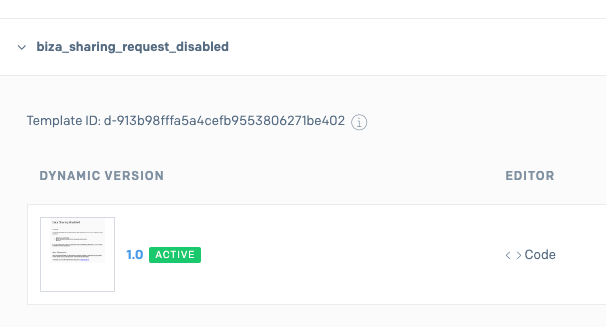
SendGrid Template ID
Consent Started event
- Subject:
Data Sharing Started
- Event:
{
  "userName": "example name",
  "softwareProductName": "Software Product Name",
  "dataHolderBrandName": "data holder",
  "sender": "example name",
  "created": "Tue, 16 Feb 2024 10:14:16 +1000",
  "expiry": "Tue, 16 Apr 2024 10:14:16 +1000",
  "collectionScopes": [
    "Name",
    "Occupation",
    "Phone",
    "Email address",
    "Mail address",
    "Residential address"
  ],
  "collectionDurationInSeconds": 86400,
  "collectionPurpose": "To share energy usage",
  "cdrReceiptId": "dc876934-c192-4f6b-b22b-625651501e9c",
  "dashboardUrl": "https://dashboard.example.com",
  "cdrPolicyUrl": "https://cdr-policy.example.com",
  "action": "START"
}
- Sample Template:
<html>
<body>
<p>
    Hi {{userName}},
</p>
<p>
    You are sharing data between {{softwareProductName}} and {{dataHolderBrandName}}, beginning {{created}}.
    This sharing will be active until {{expiry}}. The following datasets will be included:
</p>
<ul>
    {{#each collectionScopes}}
    <li>{{this}}</li>
    {{/each}}
</ul>
<p>
    {{softwareProductName}} will collect this data between {{created}} and {{expiry}}, only when you are using {{softwareProductName}}.
</p>
<p>
    You can view details of this sharing arrangement on your consumer dashboard {{dashboardUrl}}.
</p>
<p>Ref: {{cdrReceiptId}}
</p>
</body>
</html>
Consent Amended event
- Subject:
Data Sharing Amended
- Event:
{
  "collectionScopes": {
    "isModified": false,
    "previous": [
      "Name",
      "Occupation",
      "Phone",
      "Email address",
      "Mail address",
      "Residential address"
    ],
    "current": [
      "Name",
      "Occupation",
      "Phone",
      "Email address",
      "Mail address",
      "Residential address"
    ]
  },
  "collectionDurationInSeconds": {
    "isModified": false,
    "previous": 7776000,
    "current": 7776000
  },
  "collectionPurpose": {
    "isModified": false,
    "previous": "To do things",
    "current": "To do things"
  },
  "dashboardUrl": "https://dashboard.example.com",
  "dataHolderBrandName": "Test Data Holder Brand",
  "softwareProductName": "Test Software Product",
  "sender": "Test User",
  "created": "Tue, 16 Feb 2024 10:14:16 +1000",
  "expiry": "Tue, 16 Apr 2024 10:14:16 +1000",
  "cdrPolicyUrl": "https://cdr-policy.example.com",
  "action": "AMEND",
  "cdrReceiptId": "3bf87fe6-e469-4639-824c-dc6911cec44d",
  "userName": "Test User"
}
- Sample Template:
<html>
<body>
<p>
    Hi {{userName}},
</p>
<p>
    Your sharing arrangement between {{softwareProductName}} and {{dataHolderBrandName}} has been amended.
</p>
<p>
    Your arrangement
    {{#if collectionDurationInSeconds.isModified}}
    has been changed to be
    {{else}}
    is
    {{/if}}
    active between {{created}} and {{expiry}}.
</p>
<p>
    You have chosen to share these {{#if collectionScopes.isModified}} updated {{/if}} datasets
<ul>
    {{#each collectionScopes.current}}
    <li>{{this}}</li>
    {{/each}}
</ul>
</p>
<p>
    This information will be shared for the {{#if collectionPurpose.isModified}} new {{/if}} purpose:
</p>
<p>
    {{collectionPurpose.current}}
</p>
<p>
    You can view details of this arrangement on your consumer dashboard {{dashboardUrl}}.
</p>
<p>Ref: {{cdrReceiptId}}
</p>
</body>
</html>
Consent Withdrawn event
- Subject:
Data Sharing Withdrawn
- Event:
{
  "collectionScopes": [
    "Name",
    "Occupation",
    "Phone",
    "Email address",
    "Mail address",
    "Residential address"
  ],
  "dashboardUrl": "https://dashboard.example.com",
  "dataHolderBrandName": "Test Data Holder Brand",
  "collectionDurationInSeconds": 7776000,
  "softwareProductName": "Test Software Product",
  "sender": "Test User",
  "cdrPolicyUrl": "https://cdr-policy.example.com",
  "collectionPurpose": "To do things",
  "action": "WITHDRAW",
  "created": "Tue, 16 Feb 2024 10:14:16 +1000",
  "expiry": "Tue, 16 Apr 2024 10:14:16 +1000",
  "cdrReceiptId": "0414d7d3-12e7-451c-a6ce-77fbfa6f82a4",
  "userName": "Test User"
}
- Sample Template:
<html>
<body>
<p>
    Hi {{userName}},
</p>
<p>
    You have withdrawn your consent for {{softwareProductName}} to collect data from {{dataHolderBrandName}} as of {{expiry}}. The following datasets were included:
</p>
<ul>
    {{#each collectionScopes}}
    <li>{{this}}</li>
    {{/each}}
</ul>
<p>
    You can view details of this closed arrangement on your consumer dashboard {{dashboardUrl}}.
</p>
<p>Ref: {{cdrReceiptId}}
</p>
</body>
</html>
Consent Expired event
- Subject:
Data Sharing Expired
- Event:
{
  "collectionScopes": [
    "Name",
    "Occupation",
    "Phone",
    "Email address",
    "Mail address",
    "Residential address"
  ],
  "dashboardUrl": "https://dashboard.example.com",
  "dataHolderBrandName": "Test Data Holder Brand",
  "collectionDurationInSeconds": 7776000,
  "softwareProductName": "Test Software Product",
  "sender": "Test User",
  "cdrPolicyUrl": "https://cdr-policy.example.com",
  "collectionPurpose": "To do things",
  "action": "EXPIRE",
  "created": "Tue, 16 Feb 2024 10:14:16 +1000",
  "expiry": "Tue, 16 Apr 2024 10:14:16 +1000",
  "cdrReceiptId": "ba26370d-6a41-4f18-a932-017dfb876908",
  "userName": "Test User"
}
- Sample Template:
<html>
<body>
<p>
    Hi {{userName}},
</p>
<p>
    Your data sharing with {{softwareProductName}} and {{dataHolderBrandName}} has expired.
</p>
<p>
    You can view details of this arrangement on your consumer dashboard {{dashboardUrl}}.
</p>
<p>Ref: {{cdrReceiptId}}
</p>
</body>
</html>
Consent Ongoing Reminder event
- Subject:
Data Sharing Ongoing Reminder
- Event:
{
  "collectionScopes": [
    "Name",
    "Occupation",
    "Phone",
    "Email address",
    "Mail address",
    "Residential address"
  ],
  "dashboardUrl": "https://dashboard.example.com",
  "collectionDurationInSeconds": 7776000,
  "userName": "Test User",
  "dataHolderBrandName": "Test Data Holder Brand",
  "softwareProductName": "Test Software Product",
  "sender": "Test User",
  "cdrPolicyUrl": "https://cdr-policy.example.com",
  "collectionPurpose": "To do things",
  "action": "REMINDER",
  "created": "Tue, 16 Feb 2024 10:14:16 +1000",
  "expiry": "Tue, 16 Apr 2024 10:14:16 +1000",
  "cdrReceiptId": "33f64794-6cb5-4b16-8ac1-9b7ed47b7ee8"
}
- Sample Template:
<html>
<body>
<p>
    Hi {{userName}},
</p>
<p>
    This is a reminder that the consent you gave on {{created}} for {{softwareProductName}} to access your data from {{dataHolderBrandName}} is still active until {{expiry}}. This data includes:
</p>
<ul>
    {{#each collectionScopes}}
    <li>{{this}}</li>
    {{/each}}
</ul>
<p>
    You can view details of this arrangement on your consumer dashboard {{dashboardUrl}}.
</p>
<p>Ref: {{cdrReceiptId}}
</p>
</body>
</html>