Biza Test Suite (BTS)
Run broad, automated CDR API tests against a live sharing arrangement and export the results.
The Biza Test Suite (BTS) is the automated testing part of the Verification Test Suite. You run it from VTT. It calls a Data Holder's CDR Data APIs over an existing sharing arrangement, shows the results on screen, and lets you export them to CSV for use in other applications.
How it works
- Set up a sharing arrangement between VTT and the target Data Holder. The arrangement MUST stay active for the whole test run and MUST include every data scope the APIs under test need.
- Prepare test data in the target system so the required permutations exist, especially for filtering tests.
- Run the suite. VTT selects the test cases from the industry the Data Holder advertises.
- Review the results on screen, or export them to CSV.
What it does
- Automated API testing: calls CDR Data APIs over an existing sharing arrangement.
- Industry-aware selection: selects the test cases from the Data Holder's advertised industry. Against the Biza test holders, a Banking run tests 21 endpoints (Azib Bank) and an Energy run tests 17 (Azib NRG).
- Standards validation: checks responses against the Consumer Data Standards, including response payload schema validation.
- On-screen results: shows results for review, including detailed failures.
- CSV export: exports results, including request and response payloads, to CSV for use in other applications.
For the full list of endpoints, the scenarios applied to each and what each scenario tests, see Biza Test Suite coverage and scenarios.
The test suite page
Open Biza Test Suite on an arrangement opens the test suite page in a new browser tab. The page has:
- Participant: the Data Holder's name and its industry, for example
CDS_AU_DATA_SHARING_BANKING. - Agreement Scopes: scopes from the arrangement.
- Test Overview: End Points in Test, the number of endpoints the run covers, and Start Test.
- Results Summary: a ring chart with an "n of N" endpoint count, and running totals of Failure, Warning, Info and Success results. Download Test Results is enabled once there are results.
Results by endpoint
After Start Test, the endpoints run one at a time. Results By Endpoint shows a card for each endpoint, with an icon for each scenario's result, an API link to the endpoint in the Consumer Data Standards, and a re-run button.
| Icon | Meaning |
|---|---|
| Green tick | The scenario passed. |
| Amber tick | Payload validation found INFO level issues. |
| Amber circle | Payload validation found WARNING level issues. |
| Red circle | Payload validation found ERROR level issues, or the test failed. |
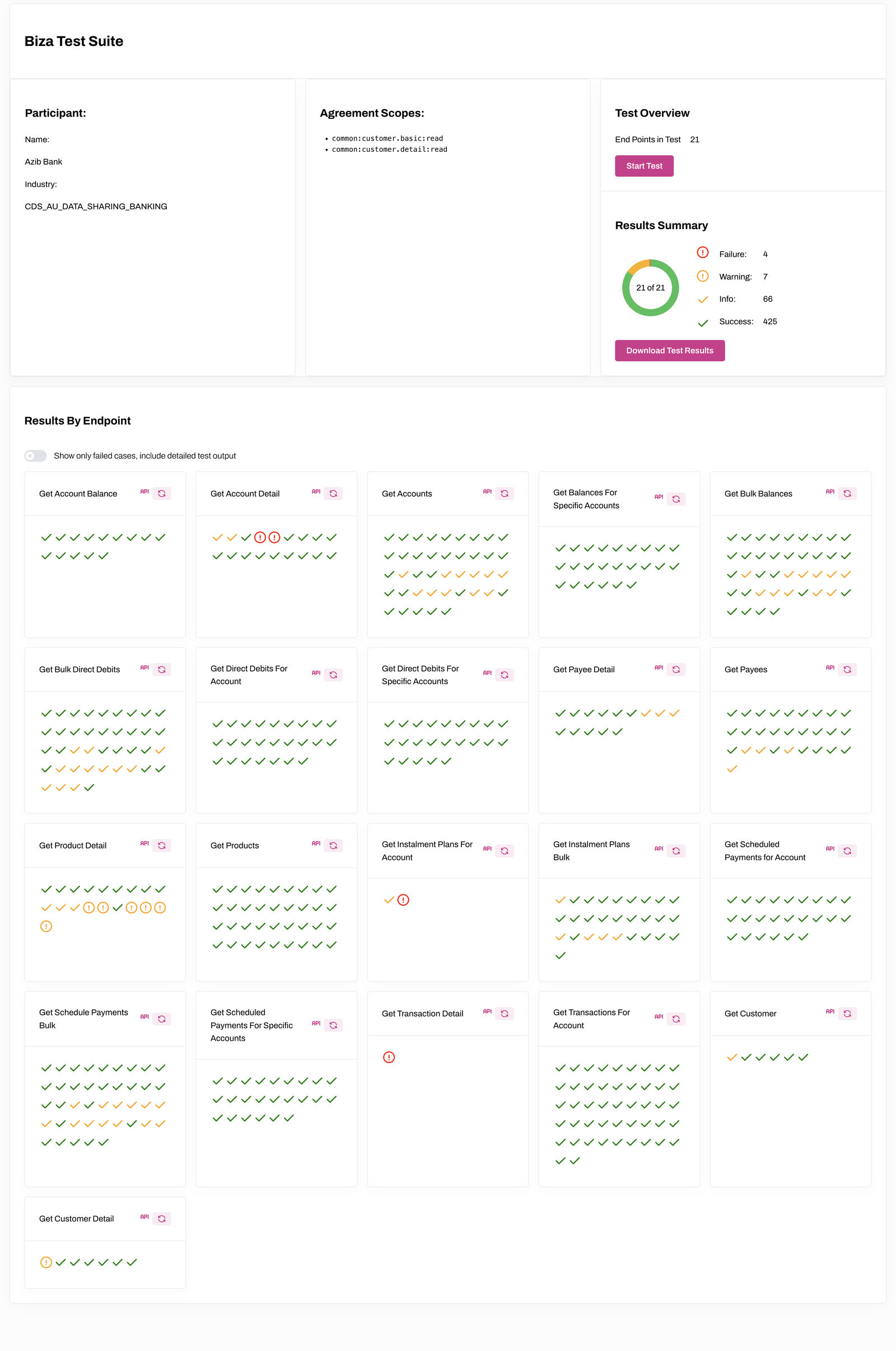
A completed Banking run against Azib Bank
Failed cases and detailed output
The Show only failed cases, include detailed test output switch changes the results to a list of the endpoints that have problems, each with a count ("Found 4 problems"). Expand an endpoint to see each problem's details, including the message and the request and response payloads.
Exported results
VTT doesn't store test results. Download Test Results creates a CSV file with every scenario's result, whatever the outcome, including the request and response payloads.
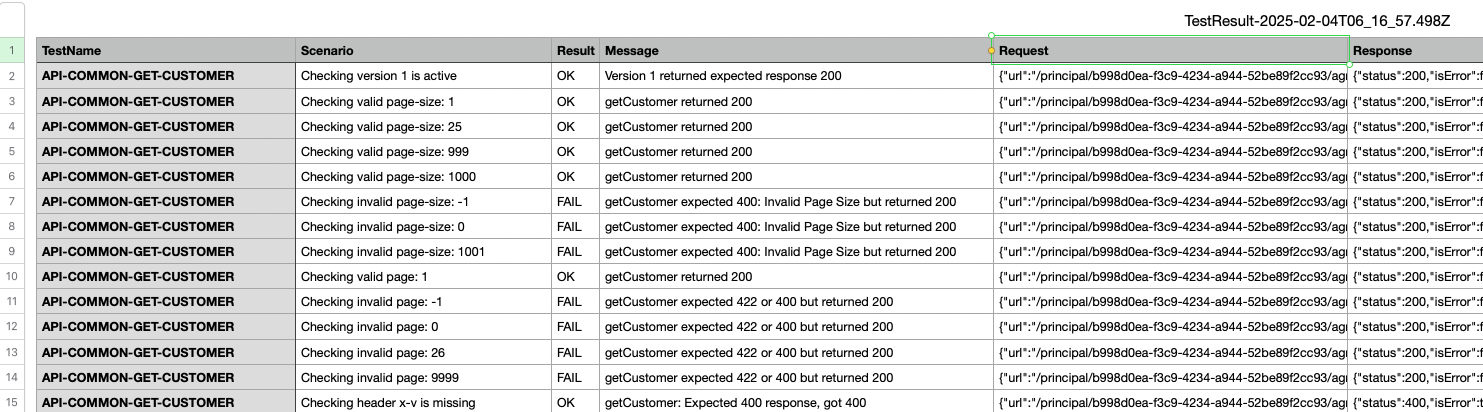
Exported test results
Customer value and use cases
- Broad coverage, low effort: exercise a large catalogue of Common, Banking and Energy endpoints in one run, instead of testing each by hand.
- Repeatable verification: re-run the suite as you fix issues, to confirm your implementation before ACCC conformance testing and go-live.
- Evidence and reporting: export results to CSV to share with stakeholders or feed into your quality processes.
- Early detection of schema issues: response payload validation finds non-compliant responses before they reach production.