Adapter Reconnection: Azure Private Link Load Balancer
Table of Accounts
| Subscription ID | Description |
|---|---|
6d304c08-2dc0-4bf1-bb2a-eba53d6a21aa | NON-PROD spaces |
09fc915a-7931-442a-ab2f-4802a1a5ab23 | PRODUCTION spaces |
Actions
To authorise and accept new connection requests to your Private Link Services, please follow the steps below.
- Navigate to Azure Portal > Private Link Center > Private Link Services.
- Select the service that represents your HaaS data adapter, or UniverseDB connection, from the list of private link services.
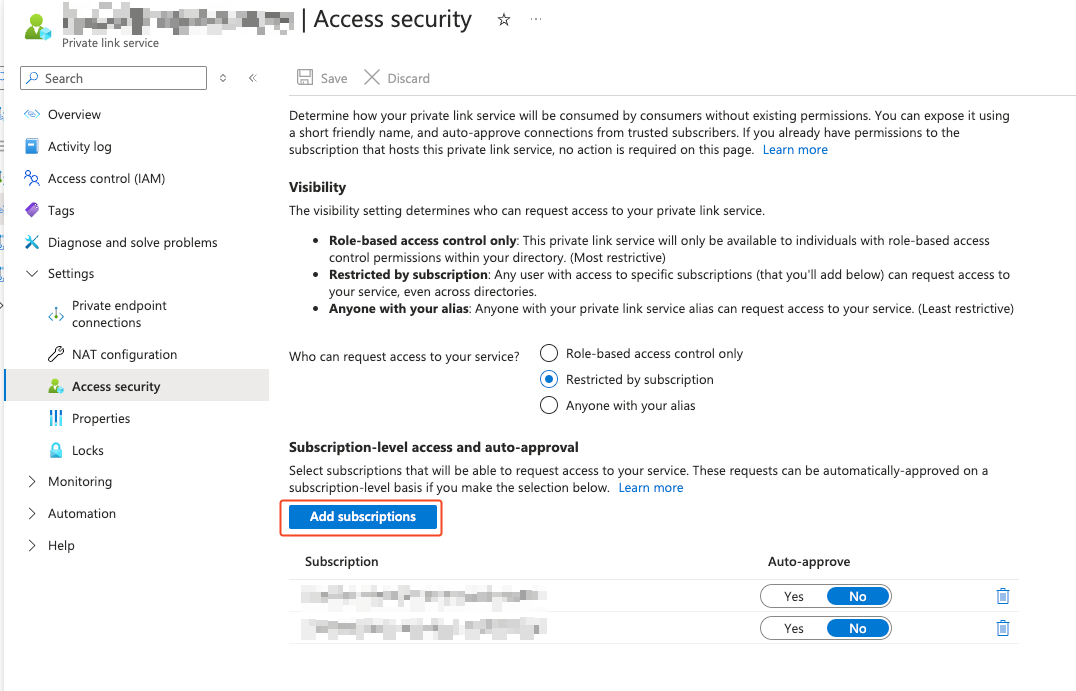
- Verify under Settings > Access Security from the sidebar that Biza’s subscription ID is authorised to request access
if restrictions are enabled. For non-production spaces, the subscription ID is
6d304c08-2dc0-4bf1-bb2a-eba53d6a21aa. If the subscription ID is not present, please add it by clicking Add subscriptions.
- Wait for notification of Biza’s connection request.
- Accept the connection by selecting Settings > Private Endpoint Connections, selecting Biza’s connection request, and clicking the Approve button at the top of the screen.