Azure Blob Storage SIEM Setup Runsheet
Related feature: Azure Blob Storage SIEM Drop Off
The Biza log service uses a Shared Access Signature (SAS) token to store SIEM logs in customer storage accounts. Customers require no additional configuration beyond securely sharing the SAS connection string with Biza to permit us to write log data to the bucket. Further background information about the intended configuration can be found here.
If your storage account has restricted network access, please ensure that the HaaS Source IPs are in your firewall allowances.
Configuration
To generate a SAS connection string appropriate for SIEM Storage Account Drop Off, create a storage account with the default configuration.
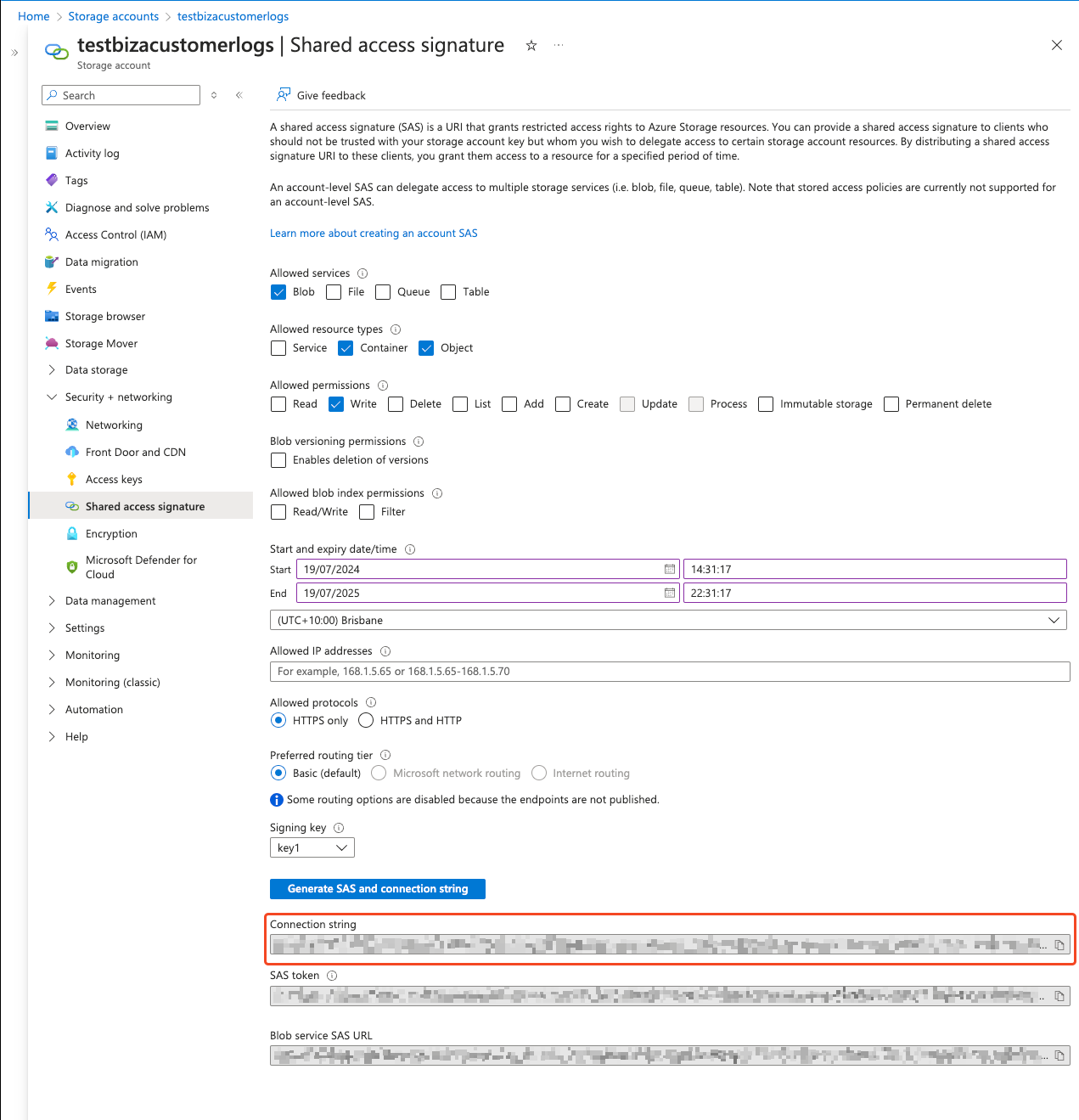
- Afterwards, navigate to the “Security + networking” section of the storage account and select “Shared access signature”
- Configure the SAS as per the screenshot below. Please pay careful attention to the expiry date/time end and increase the expiry time to 1 year
- Click “Generate SAS and connection string”, and then securely transmit the “Connection string” text to allow Biza to configure the SIEM log drop off
The SAS Connection string must be recreated and securely transmitted to Biza at least 2 weeks before the expiry date to ensure continued operation of the service