Configure Notifications
Notifications are sent to consumers via email. The currently supported email engines are
This guide outlines the set up process required to configure sendgrid and produce the configuration items required by Open Gateway (OG).
CDR Notification Requirements
Using Legislation - Competition and Consumer (Consumer Data Right) Rules 2020
- Compilation No. 8
- Compilation date: 22 July 2023
- Includes amendments up to: F2023L01027
- Registered: 18 August 2023
CDR requirements are as follows
- create, amend, and withdraw requirements as per Section 4.18
- consent expiry requirements as per Section 4.18A
- ongoing notification requirements as per Section 4.20
Overview
To correctly set up SendGrid integration with OG you'll need to complete all the steps below. Once complete, those details will need to be provided to Biza through your onboarding channel so they can be applied to your Open Gateway instance.
Instance Configuration
The outcomes of this configuration exercise are broken down into the following items.
| Configuration | Description |
|---|---|
| API_KEY | The SendGrid API Key that has Send Mail API access. |
| FROM_NAME (optional) | A name or title associated with the email address (e.g. Example Company). |
| FROM_ADDRESS | The email address that the emails should be sent from (e.g. cdr@examplerecipient.com). |
| NOTIFICATION_TIMEZONE | The timezone to be used in date/time fields in the notification. |
| COLLECTION_CONSENT_STARTED_TEMPLATE_ID | The template ID for the Consent Started event. |
| COLLECTION_CONSENT_AMENDED_TEMPLATE_ID | The template ID for the Consent Amended event. |
| COLLECTION_CONSENT_WITHDRAWN_TEMPLATE_ID | The template ID for the Consent Withdrawn event. |
| COLLECTION_CONSENT_EXPIRED_TEMPLATE_ID | The template ID for the Consent Expired event. |
| CONSENT_ONGOING_REMINDER_TEMPLATE_ID | The template ID for the Consent Ongoing Reminder event. |
SendGrid API Key
Access to SendGrid APIs are controlled via an API Key. Once created, this key needs to be shared with OG so it can invoke the API to trigger emails. We recommended you create two keys - one for production and one for non-production use.
Steps:
- See: https://docs.sendgrid.com/ui/account-and-settings/api-keys#creating-an-api-key
- Select Restricted Access then expand
Mail Sendand checkMail Sendto full access. - Save the API Key and supply to Biza through your usual onboarding channels, noting that this is secret material and should be transferred with care.
From Address
Open Gateway allows the from address to be chosen and is what will be seen be consumers when viewing the email. Consideration of how this email address will be used by consumers is important.
It is imperative that you check that SendGrid domain authentication is successfully configured for the from address domain to reduce the likelihood that the emails will be filtered as spam. You can check this in the Sender Authentication section in the SendGrid console, where there should be a verified line in Domain Authentication for the domain.
If the domain authentication is not yet setup, setting it up is a specialised task and requires the assistance of your DNS administrator. https://docs.sendgrid.com/ui/account-and-settings/how-to-set-up-domain-authentication
Notification Timezone
Dates and times of events will be converted to this selected timezone and sent to SendGrid for processing as the email payload. The allowed values are as follows
- Australia/Adelaide (+09:30)
- Australia/Brisbane (+10:00)
- Australia/Broken_Hill (+09:30)
- Australia/Darwin (+09:30)
- Australia/Eucla (+08:45)
- Australia/Hobart (+10:00)
- Australia/Lindeman (+10:00)
- Australia/Lord_Howe (+10:30)
- Australia/Melbourne (+10:00)
- Australia/Perth (+08:00)
- Australia/Sydney (+10:00)
Templates
The SendGrid templates allow customer control of email branding in a way completely separate from OG. The active version of a template can be changed without affecting the template ID, allowing for templates to be upgraded and rolled back to previous versions if an issue is detected.
There is a specific JSON payload for each event type which OG will send to the sendMail SendGrid API as a data template data payload. The following sections will describe the JSON payload for each event and a sample template for each.
The template ID can be found by expanding the template in the dynamic template list. Copy each one of these template IDs into the relevant template ID in your OG configuration. The subject field can be customised as required.
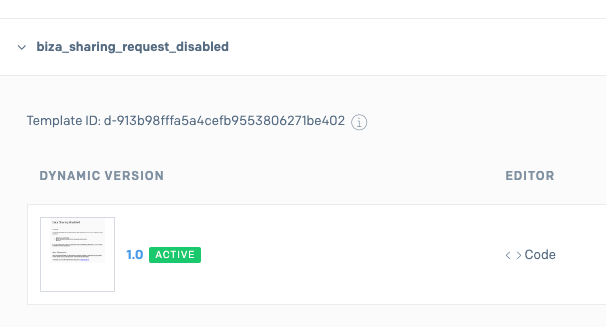
Send Grid Template ID
Consent Started Event
- Subject:
Data Sharing Started
- Event:
{
  "userName": "example name",
  "softwareProductName": "Software Product Name",
  "dataHolderBrandName": "data holder",
  "sender": "example name",
  "created": "Tue, 16 Feb 2024 10:14:16 +1000",
  "expiry": "Tue, 16 Apr 2024 10:14:16 +1000",
  "collectionScopes": [
    "Name",
    "Occupation",
    "Phone",
    "Email address",
    "Mail address",
    "Residential address"
  ],
  "collectionDurationInSeconds": 86400,
  "collectionPurpose": "To share energy usage",
  "cdrReceiptId": "dc876934-c192-4f6b-b22b-625651501e9c",
  "action": "START"
}
- Sample Template:
<html>
<body>
<p>
    Hi {{userName}},
</p>
<p>
    You sharing data between {{softwareProductName}} and {{dataHolderBrandName}} beginning {{created}}.
    This sharing will be active until {{expiry}}. The following datasets will be included:
</p>
<ul>
    {{#each collectionScopes}}
    <li>{{this}}</li>
    {{/each}}
</ul>
<p>
    {{softwareProductName}} will collect this data between {{created}} and {{expiry}} only when the {{softwareProductName}} is being accessed.
</p>
<p>
    You can view details of this sharing arrangment on your consumer dashboard {{dashboardUrl}}.
</p>
<p>Ref: {{cdrReceiptId}}
</p>
</body>
</html>
Consent Amended Event
- Subject:
Data Sharing Amended
- Event:
{
  "collectionScopes": {
    "isModified": false,
    "previous": [
      "Name",
      "Occupation",
      "Phone",
      "Email address",
      "Mail address",
      "Residential address"
    ],
    "current": [
      "Name",
      "Occupation",
      "Phone",
      "Email address",
      "Mail address",
      "Residential address"
    ]
  },
  "collectionDurationInSeconds": {
    "isModified": false,
    "previous": 7776000,
    "current": 7776000
  },
  "collectionPurpose": {
    "isModified": false,
    "previous": "To do things",
    "current": "To do things"
  },
  "dashboardUrl": "https://dashboard.biza-og-dev.runtimes.2492.au",
  "dataHolderBrandName": "Test Data Holder Brand",
  "softwareProductName": "Test Software Product",
  "sender": "Test User",
  "created": "Tue, 16 Feb 2024 10:14:16 +1000",
  "expiry": "Tue, 16 Apr 2024 10:14:16 +1000",
  "cdrPolicyUrl": "https://cdr-policy.biza-og-dev.runtimes.2492.au",
  "action": "AMEND",
  "cdrReceiptId": "3bf87fe6-e469-4639-824c-dc6911cec44d",
  "userName": "Test User"
}
- Sample Template:
<html>
<body>
<p>
    Hi {{userName}},
</p>
<p>
    Your sharing arrangement between {{softwareProductName}} and {{dataHolderBrandName}} has been amended.
</p>
<p>
    Your arrangement
    {{#if collectionDurationInSeconds.isModified}}
    has been changed to be
    {{else}}
    is
    {{/if}}
    active between {{created}} and {{expiry}}.
</p>
<p>
    You have chosen to share these {{#if collectionScopes.isModified}} updated {{/if}} datasets
<ul>
    {{#each collectionScopes.current}}
    <li>{{this}}</li>
    {{/each}}
</ul>
</p>
<p>
    This information will be shared for the {{#if collectionPurpose.isModified}} new {{/if}} purpose:
</p>
<p>
    {{collectionPurpose.current}}
</p>
<p>
    You can view details of this arrangement on your consumer dashboard {{dashboardUrl}}.
</p>
<p>Ref: {{cdrReceiptId}}
</p>
</body>
</html>
Consent Withdrawn Event
- Subject:
Data Sharing Withdrawn
- Event:
{
  "collectionScopes": [
    "Name",
    "Occupation",
    "Phone",
    "Email address",
    "Mail address",
    "Residential address"
  ],
  "dashboardUrl": "https://dashboard.biza-og-dev.runtimes.2492.au",
  "dataHolderBrandName": "Test Data Holder Brand",
  "collectionDurationInSeconds": 7776000,
  "softwareProductName": "Test Software Product",
  "sender": "Test User",
  "cdrPolicyUrl": "https://cdr-policy.biza-og-dev.runtimes.2492.au",
  "collectionPurpose": "To do things",
  "action": "WITHDRAW",
  "created": "Tue, 16 Feb 2024 10:14:16 +1000",
  "expiry": "Tue, 16 Apr 2024 10:14:16 +1000",
  "cdrReceiptId": "0414d7d3-12e7-451c-a6ce-77fbfa6f82a4",
  "userName": "Test User"
}
- Sample Template:
<html>
<body>
<p>
    Hi {{userName}},
</p>
<p>
    You have withdrew your consent for {{softwareProductName}} to collect data from {{dataHolderBrandName}} as of {{expiry}}. The following datasets will were included:
</p>
<ul>
    {{#each collectionScopes}}
    <li>{{this}}</li>
    {{/each}}
</ul>
<p>
    You can view details of this closed arrangement on your consumer dashboard {{dashboardUrl}}.
</p>
<p>Ref: {{cdrReceiptId}}
</p>
</body>
</html>
Consent Expired Events
- Subject:
Data Sharing Expired
- Event:
{
  "collectionScopes": [
    "Name",
    "Occupation",
    "Phone",
    "Email address",
    "Mail address",
    "Residential address"
  ],
  "dashboardUrl": "https://dashboard.biza-og-dev.runtimes.2492.au",
  "dataHolderBrandName": "Test Data Holder Brand",
  "collectionDurationInSeconds": 7776000,
  "softwareProductName": "Test Software Product",
  "sender": "Test User",
  "cdrPolicyUrl": "https://cdr-policy.biza-og-dev.runtimes.2492.au",
  "collectionPurpose": "To do things",
  "action": "EXPIRE",
  "created": "Tue, 16 Feb 2024 10:14:16 +1000",
  "expiry": "Tue, 16 Apr 2024 10:14:16 +1000",
  "cdrReceiptId": "ba26370d-6a41-4f18-a932-017dfb876908",
  "userName": "Test User"
}
- Sample Template:
<html>
<body>
<p>
    Hi {{userName}},
</p>
<p>
    Your data sharing with {{softwareProductName}} and {{dataHolderBrandName}} has expired.
</p>
<p>
    You can view details of this arrangement on your consumer dashboard {{dashboardUrl}}.
</p>
<p>Ref: {{cdrReceiptId}}
</p>
</body>
</html>
Consent Ongoing Reminder Event
- Subject:
Data Sharing Ongoing Reminder
- Event:
{
  "collectionScopes": [
    "Name",
    "Occupation",
    "Phone",
    "Email address",
    "Mail address",
    "Residential address"
  ],
  "dashboardUrl": "https://dashboard.biza-og-dev.runtimes.2492.au",
  "collectionDurationInSeconds": 7776000,
  "created": "Tue, 9 Apr 2024 08:29:50 +1000",
  "userName": "Test User",
  "dataHolderBrandName": "Test Data Holder Brand",
  "softwareProductName": "Test Software Product",
  "sender": "Test User",
  "cdrPolicyUrl": "https://cdr-policy.biza-og-dev.runtimes.2492.au",
  "collectionPurpose": "To do things",
  "action": "REMINDER",
  "created": "Tue, 16 Feb 2024 10:14:16 +1000",
  "expiry": "Tue, 16 Apr 2024 10:14:16 +1000",
  "cdrReceiptId": "33f64794-6cb5-4b16-8ac1-9b7ed47b7ee8"
}
- Sample Template:
<html>
<body>
<p>
    Hi {{userName}},
</p>
<p>
    This is a reminder that your consent for {{softwareProductName}} to access your data from {{dataHolderBrandName}} on {{created}} is still active until {{expiry}}. This data includes
<p>
<ul>
    {{#each collectionScopes}}
    <li>{{this}}</li>
    {{/each}}
</ul>
You can view details of this closed arrangement on your consumer dashboard {{dashboardUrl}}.
</p>
<p>Ref: {{cdrReceiptId}}
</p>
</body>
</html>