Frequently Asked Questions
Here you will find answers to the most common Biza ID questions
General Questions
How do I contact Biza?
The best way to contact us is via a service desk ticket. Instructions for doing so can be found HERE
What is Biza ID, and how does it work?
Biza ID is a modern identity management system designed to provide secure and unified authentication across all Biza platforms. It supports industry-standard protocols, enabling seamless integration with existing identity providers, such as Entra ID.
What authentication standards does Biza ID support?
Biza ID supports OpenID Connect, OAuth2, and SAML.
Which identity providers are supported by Biza ID?
It currently supports Entra ID and Okta.
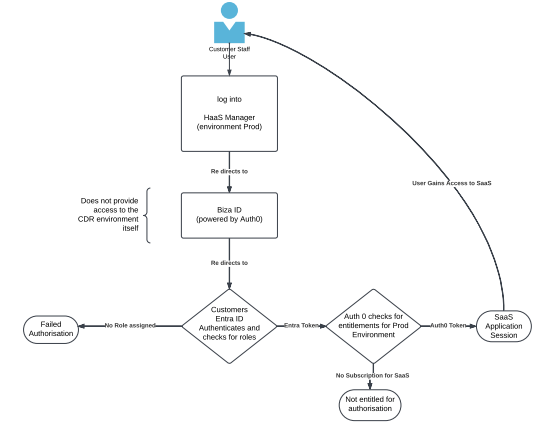
How does authentication flow work for Biza ID?
Biza ID's authentication flow is summarised in the diagram below.
Federation and integration
What information does Biza need to set up my organisation in Biza ID?
We require your organisation’s name and base domain to configure your account in Biza ID and enable federation.
How do I federate my organisation’s Entra ID with Biza ID?
Please refer to our quick reference guide for detail, but at a high-level, to federate with Entra ID:
- Provide Biza with your organisation’s name and base domain.
- Approve the Entra ID application in your tenant
- Authorise Entra users and groups
What happens if your organisation’s domain changes?
If your domain changes, please notify us. We will update your configuration to ensure your access to our services isn’t interrupted.
What is an Admin consent?
Admin consent refers to the process where an administrator in a customer’s Azure Active Directory (Azure AD) tenant grants the necessary permissions for a multi-tenant application to access their tenant’s resources on behalf of users within their organisation.
Who provides admin consent?
Global administrator of the Entra ID tenant.
Who is required for Biza ID federation
The global administrator of the Entra ID tenant.
How many times is the Global Administrator required to provide admin consent?
Only once.
What permissions have been granted?
The permissions in the following table have been granted. Please ensure you send these to your Security team for approval and to your Domain Administrator to sign off.
| API Name | Claim Value | Permission | Type |
|---|---|---|---|
| Microsoft Graph | openid | Sign users in | Delegated |
| Microsoft Graph | profile | View users' basic profile | Delegated |
| Microsoft Graph | View users' email address | Delegated | |
| Microsoft Graph | User.Read | Sign in and read user profile | Delegated |
User Management
How do I add or remove users in Biza ID??
Federated users are managed through your identity provider. For non-federated users, the Biza administrative team can manually add or remove users in the Biza ID portal.
Can I assign roles or permissions to groups of users?
Yes, Biza supports group-based access control. You can map groups in your identity provider to roles in Biza ID to streamline management.
Do you support SCIM provisioning for automatic user provisioning?
Yes, Biza ID supports SCIM to synchronise users and groups from your identity provider automatically
Access and security
How does Biza ID handle security and data privacy?
Biza ID adheres to industry best practices for security and privacy, including encryption of data in transit and at rest. It uses secure protocols like OAuth2 and OpenID Connect to protect user identities.
What should I do if users are unable to log in?
- Check that the user’s account is active in your identity provider.
- Ensure roles and groups are mappings are correctly configured.
- Contact Biza if the issue persists.
How does Biza ID enforce access control for different applications and services?
Biza ID uses group-based role mapping and application-specific entitlements to enforce access control. Only authorised users or groups can access specific applications
Support and troubleshooting
What support is available if I encounter issues with Biza ID?
Our support team is available to assist with technical issues and setup guidance. Contact us by the support portal or your account manager.
How do I reset a user’s access or credentials?
For federated users, you can reset your credentials in your identity provider. For non-federated users, the Biza administrative team can assist.