Joint Accounts and Secondary Users (Energy)
This applies to consumers consenting to share data who are either joint account owners or secondary users for an account in the energy sector.
1. Initiate consent flow by entering a valid email address. Click Next.
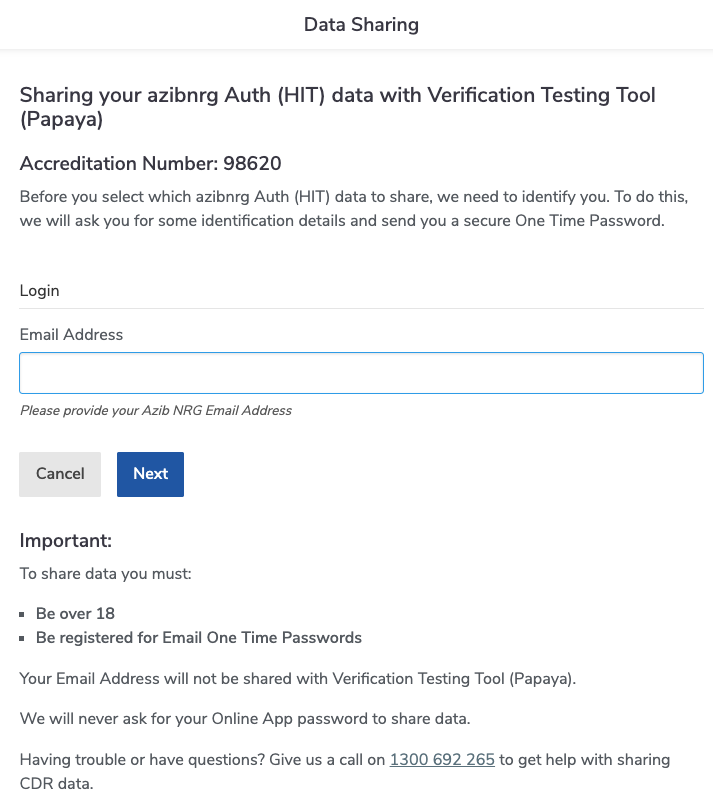
In the case where no fields are supplied, the data adapter will not be called. At least one field must be specified.
Double Blinded OTP API mapping
| Step # | User Action | API called | Field Name | Notes |
|---|---|---|---|---|
| Step 1 The first step in consent flow is to initiate user authentication. | Enter log in details (i.e., a valid identifier). | Init Login (POST /login/init) | Request body schema: V0 ▪ username V1 ▪ username ▪ email ▪ phoneNumber ▪ dateOfBirth ▪ invoiceRef V0 is used when only the username is needed, whilst V1 allows customers to select one or more fields. This configuration is determined during initial HaaS setup. | In this step the username is accepted via the Data Adapter, the customer sends a OTP via their own mechanism and a unique Request Identifier (requestId) is returned. No other information is disclosed at this point. Customers must implement this endpoint to return a username and manage OTPs themselves. |
See Double Blinded Authentication for more information.
Biza Managed OTP API mapping
| Step # | User Action | API called | Field Name | Notes |
|---|---|---|---|---|
| Step 1 The first step in consent flow is to initiate user authentication. | Enter log in details (i.e., a valid identifier). | Get Username Attributes (POST /user/attribute) | Request body schema: V0 ▪ username V1 ▪ username ▪ email ▪ phoneNumber ▪ dateOfBirth ▪ invoiceRef V0 is used when only the username is needed, whilst V1 allows customers to select one or more available fields (note that all API parameters are optional if V1 is used). This configuration is determined during initial HaaS setup. | The Username (username) is accepted via the Data Adapter and a unique User Identifier (userID) and methods for OTP receipt (mobile and/or email) is returned. SMS or email is determined based on if a mobile or email is returned from this endpoint (if both, SMS will be sent.) If SMS, the OTP will be sent via Telstra, else: If email, where there are two options. 1. Sendgrid via the Get User Notification Information API ( POST /user/notification-info). 2. The customer’s own mechanism using the implemented Send Notification ( POST /notification) endpoint. After processing the OTP methods HaaS generates a OTP and dispatches it to the User. |
See Biza Managed authentication for more information.
2. Enter the OTP into the One Time Password box and click Next.
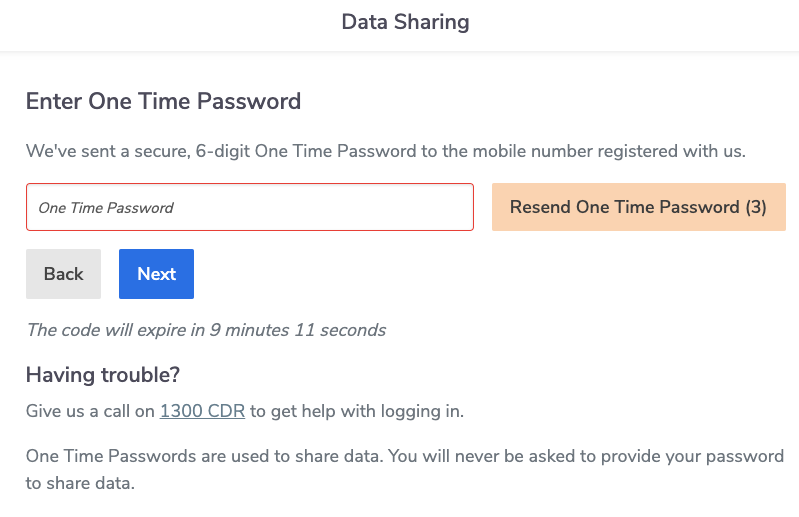
Double Blinded API mapping
| Step # | User Action | API called | Field Name | Notes |
|---|---|---|---|---|
| Step 2 This second step is where the user enters the supplied OTP. | Enter the OTP | Verify Login (POST /login/verify) | Request body schema requestId and otpValue | This step uses the requestId obtained from the first step (the username/identifier entered in Step 1) and the supplied OTP to verify the login, and returns a set of customer identifiers (userId and principalIds) that have now been validated. This endpoint will only be called when a correct OTP has been entered and the user has clicked Next. This endpoint verifies the one-time password (OTP). The OTP entered by the user is submitted to /login/verify for validation. 3 unsuccessful attempts then new consent flow with the OTP code, no limit of consent per day. |
See Double Blinded authentication for more information.
Biza Managed API mapping
| Step # | User Action | API called | Field Name | Notes |
|---|---|---|---|---|
| Step 2 This second step is where the user enters the supplied OTP. | Enter OTP | The OTP entered by the User and the previously obtained userId is retrieved. The OTP is then validated by HaaS. 3 unsuccessful attempts then new consent flow with the OTP code, no limit of consent per day |
See Biza Managed authentication for more information.
3. Select an eligible customer who is a joint account holder or secondary user for which you wish to share data.
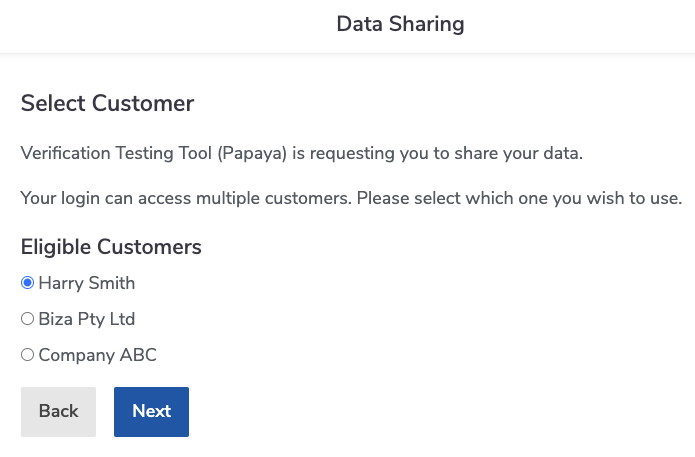
Double Blinded API mapping
| Step # | User Action | API called | Field Name | Notes |
|---|---|---|---|---|
| Step 3 The third step in consent flow is to obtain the list of eligible customers for which the user is authorised to consent to data sharing. | Select Eligible Customer from which to share data (this screen will be skipped if only one principalId is returned.) | Vulnerable authority ▪ If data adapter is authoritative, source vulnerability status from the data adapter, or, ▪ If HaaS Manager is authoritative, source vulnerability flag from HaaS Manager database Nominated Representative authority ▪ If Data adapter is authoritative, when NR is found, Get Customer ( GET /customer/{principalId}) is triggered, else this step is skipped, or, ▪ If HaaS Manager is authoritative, Source Nominated Representative principalId from HaaS Manager Database. Authority to Operate (ATO) ▪ If data adapter is authoritative, when ATO is found, Get Customer ( GET /customer/{principalId}) is triggered, else this step is skipped, or, ▪ If HaaS Manager is authoritative, source ATO principalId from HaaS Manager Database. Get User ( POST /login/user) for each userId and principalId combination | Response body schema: Get Customer customerType If person: prefix + firstName + middleNames + lastName + suffix (displayed in UI). If organisation: name (displayed in UI). Get User principalName (displayed in UI) | If only one principalId is returned, the Eligible Customer screen will be skipped. If more than one principalId is returned, the user must select the Eligible Customer for which they wish to share data. |
Biza Managed API mapping
| Step # | User Action | API called | Field Name | Notes |
|---|---|---|---|---|
| Step 3 The third step in consent flow is to obtain the list of eligible customers for which the user is authorised to consent to data sharing. | Select Eligible Customer from which to share data (this screen will be skipped if only one principalId is returned.) | 1. Get User Principals (POST /user/principal) Vulnerable authority ▪ If data adapter is authoritative, source vulnerability status from the data adapter, or, ▪ If HaaS Manager is authoritative, source vulnerability flag from HaaS Manager database Nominated Representative authority ▪ If Data adapter is authoritative, when NR is found, Get Customer ( GET /customer/{principalId}) is triggered, else this step is skipped, or, ▪ If HaaS Manager is authoritative, Source Nominated Representative principalId from HaaS Manager Database. Authority to Operate (ATO) ▪ If data adapter is authoritative, when ATO is found, Get Customer ( GET /customer/{principalId}) is triggered, else this step is skipped, or, ▪ If HaaS Manager is authoritative, source ATO principalId from HaaS Manager Database. 2. Get User ( POST /login/user) for each userId and principalId combination | Response body schema: Get User Principals userId Get User userId principalId. | The userId and otp submitted by the User are received. the Get User Principals API returns a list of Principal Identifiers (principalIds) and a single userId. If more than one principalId is returned, the user must select the Eligible Customer for which they wish to share data. |
4. Select an eligible account from which you wish to share data. If the account has other owners, the “Things you should know” information box will appear.
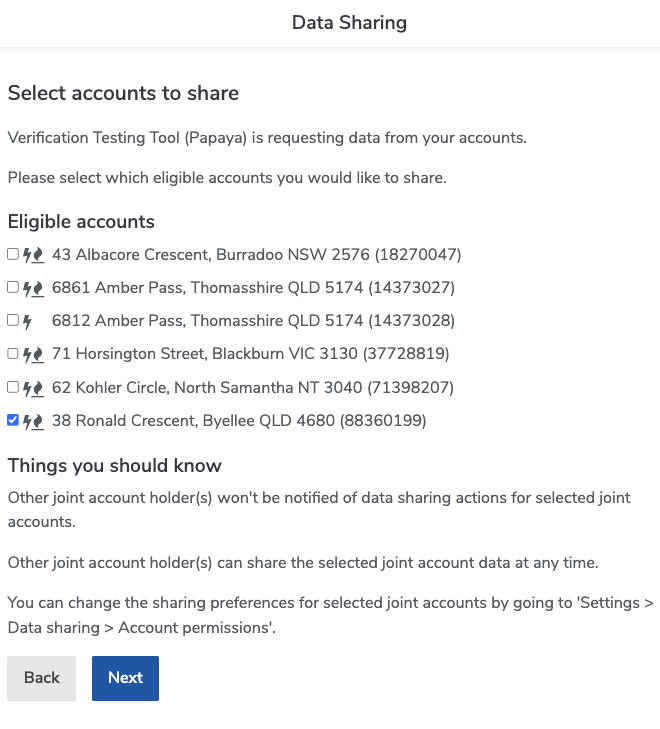
API mapping
| Step # | User Action | API called | Field Name | Notes |
|---|---|---|---|---|
| Step 4 The fourth step in consent flow obtains the list of accounts available under the authorised consent for sharing. | Select Eligible Account(s) from which to share data. | 1. List Energy Accounts (GET /energy/{principalId}/account). 2. DOMS record (disclosure option) of the account with more than 1 “OWNER” customers in one account’s “accountCustomers” array to determine whether this joint account is approved for sharing, otherwise the account will be dropped. | 1. List Energy Accounts (Response Schema) - nickname, else, displayName + accountNumber (masked except on the last 4 digits) + status (CLOSED only). Only accounts with userId of the current logged in user is one of the userIds in accountCustomers array are displayed. | This List Energy Accounts data adapter call happens before the page is loaded for the principal(s) returned in Step 3. |
5. Review the Data to be shared section (noting that each can be expanded by clicking the arrow) on the data sharing confirmation screen. Click I confirm to proceed with data sharing.
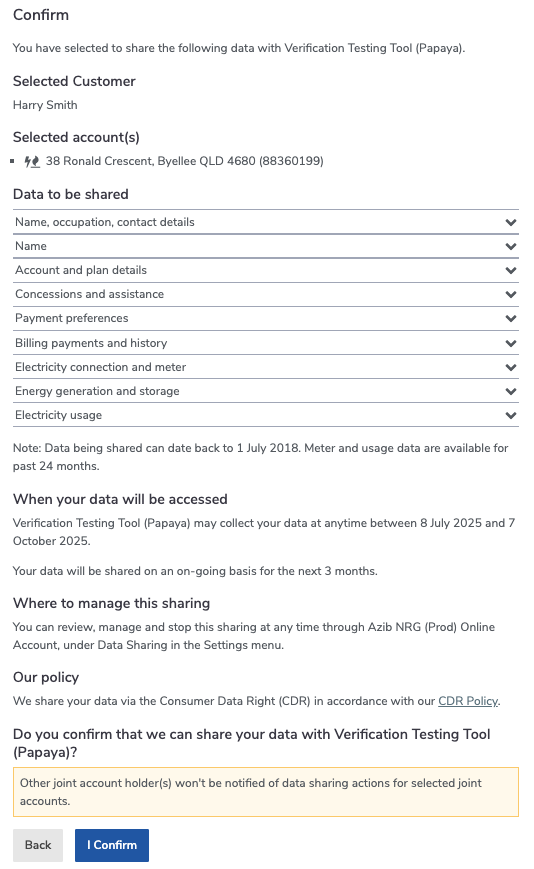
There are no APIs called for this step.
6. The consent flow ends with an email notifying other account holders that a joint account holder or secondary user has consented to share data.
API mapping
| Step # | User Action | API called | Field Name | Notes |
|---|---|---|---|---|
| Step 6 A notification email is sent to users associate with the account for which data has been shared. | Notification email sent | If SendGrid Notifications are managed via Biza calling the SendGrid APIs with the preconfigured from address and the template IDs. If adapter based 1. Get User Notification ( POST /user/notification-info) 2. Send Notification ( POST /notification) | Get User Notification Information (Response Schema) ▪ name ▪ email. Notification response schema ▪ data (reponse payload from sending a notification). | The notification will be triggered if there are more than one accountCustomers in the List Energy response array called previously (not applicable if the currently logged in consumer is vulnerable) |