Step 2. OTP Prompt
The second step when logging into the dashboard uses the supplied request identifier (the username/identifier entered in Step 1) and the resulting supplied One Time Password (OTP) to verify the login, and returns a set of customer identifiers that have now been validated.
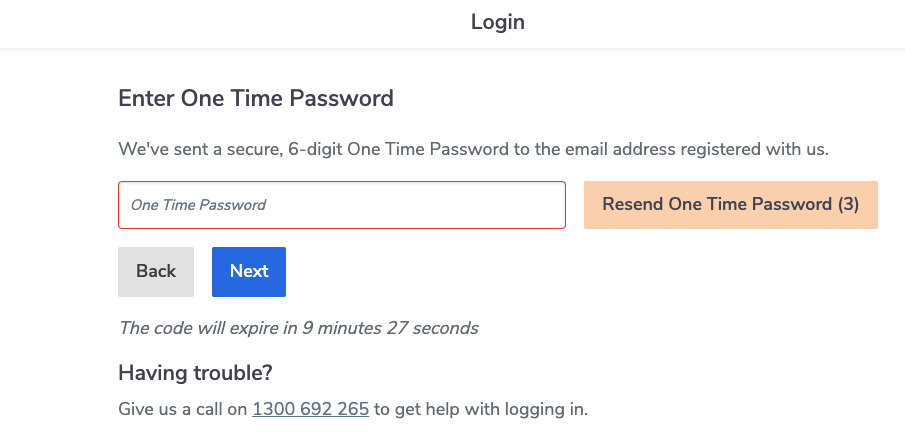
Screen displayed to user
Users will be presented wih a screen similar to the following.
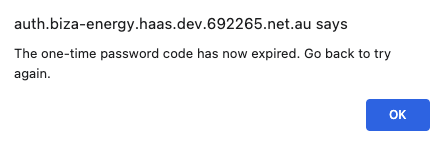
Time-out error
If the user fails to enter the OTP within the 10 minute timeframe they will see a popup message similar to below.
Adapter call
These endpoints will only be called when a correct OTP has been entered.
The data adapter call happens upon clicking ‘Next’ (see screenshot above).
Double-Blinded (DBL) authentication
Verify Login
POST/login/verify
Biza-Managed (BM) authentication
Get User Principals
POST/user/principal
Double-Blinded (DBL) Responses and Error Mapping
These errors pertain to the Verify Login adapter call (POST/login/verify).
HTTP Status - 200 - Success
This applies when a user receives and enters the correct OTP.
- Next action
- The user will be taken to Step 3 and see a list of principals to select from
- Screen displayed

HTTP Status - 400 - Invalid Field
This applies when the request ID is malformed.
- URN code
"urn:au-cds:error:cds-all:Field/Invalid"
- Next action
- OAuth server error. Redirect back to Dashboard Login screen upon clicking “Log Back In”.
- Error to user
- Server_Error
- Screen displayed to user
- coming soon
HTTP Status - 400 - Expected Error Encountered
- URN code
"urn:au-cds:error:cds-all:GeneralError/Expected"
- Next action
- OAuth server error. Redirect back to Dashboard Login screen upon clicking “Log Back In”.
- Error to user
- Server_Error
- Screen displayed to user
- coming soon
HTTP Status - 400 - Invalid Header
- URN code
"urn:au-cds:error:cds-all:Header/Invalid"
- Next action
- OAuth server error. Redirect back to Dashboard Login screen upon clicking “Log Back In”.
- Error to user
- Server_Error
- Screen displayed to user
- coming soon
HTTP Status - 429 - Too Many Requests
This is used for data adapter rate limiting to the HaaS platform.
- Next action
- OAuth server error. Redirect back to Dashboard Login screen upon clicking “Log Back In”.
- Error to user
- Server_Error
- Screen displayed to user
- coming soon
HTTP Status - 451 - Legal Block
This applies when the Data Holder is actively preventing a user from being authenticated for legal reasons. The status code indicates that the server is denying access to the resource as a consequence of a legal demand. Consumer account will be dropped from consumer selector page (i.e., ignore principal).
Please note that this generic 451 flag will be carried over to Step 3.
- URN code
"urn:dio:error:cds-all:Resource/LegalBlock"
- Next Action
- User will be taken to profile selection in Step 3 page where there will be no principals available to select (see Step 3 for further information.)
- Error to user
- No error will be shown to the user - they will progress to the next step.
HTTP Status - 451 - Ineligible
This applies when the Data Holder is actively preventing a user from being authenticated as they are ineligible for CDR data sharing. This status code indicates that the Customer is ineligible for CDR Data Sharing. Ineligible user flag set to true.
Please note that this generic 451 flag will be carried over to Step 3.
- URN code
urn:dio:error:cds-all:Resource/IneligibleBlock
- Next Action
- Goes to profile selection in Step 3 page where there will be no principals available to select (see Step 3 for further information.)
- Error to user
- No error will be shown to the user - they will progress to the next step.
HTTP Status - 451 - Call Centre Block
This applies when the Data Holder is actively preventing user from being authenticated. The status code indicates that the customer should call the Call Center for further information.
Please note that this generic 451 flag will be carried over to Step 3.
- URN code
urn:dio:error:cds-all:Resource/CallCenterBlock
- Next Action
- Goes to profile selection in Step 3 page where there will be no principals available to select (see Step 3 for further information.)
- Error to user
- No error will be shown to the user - they will progress to the next step.
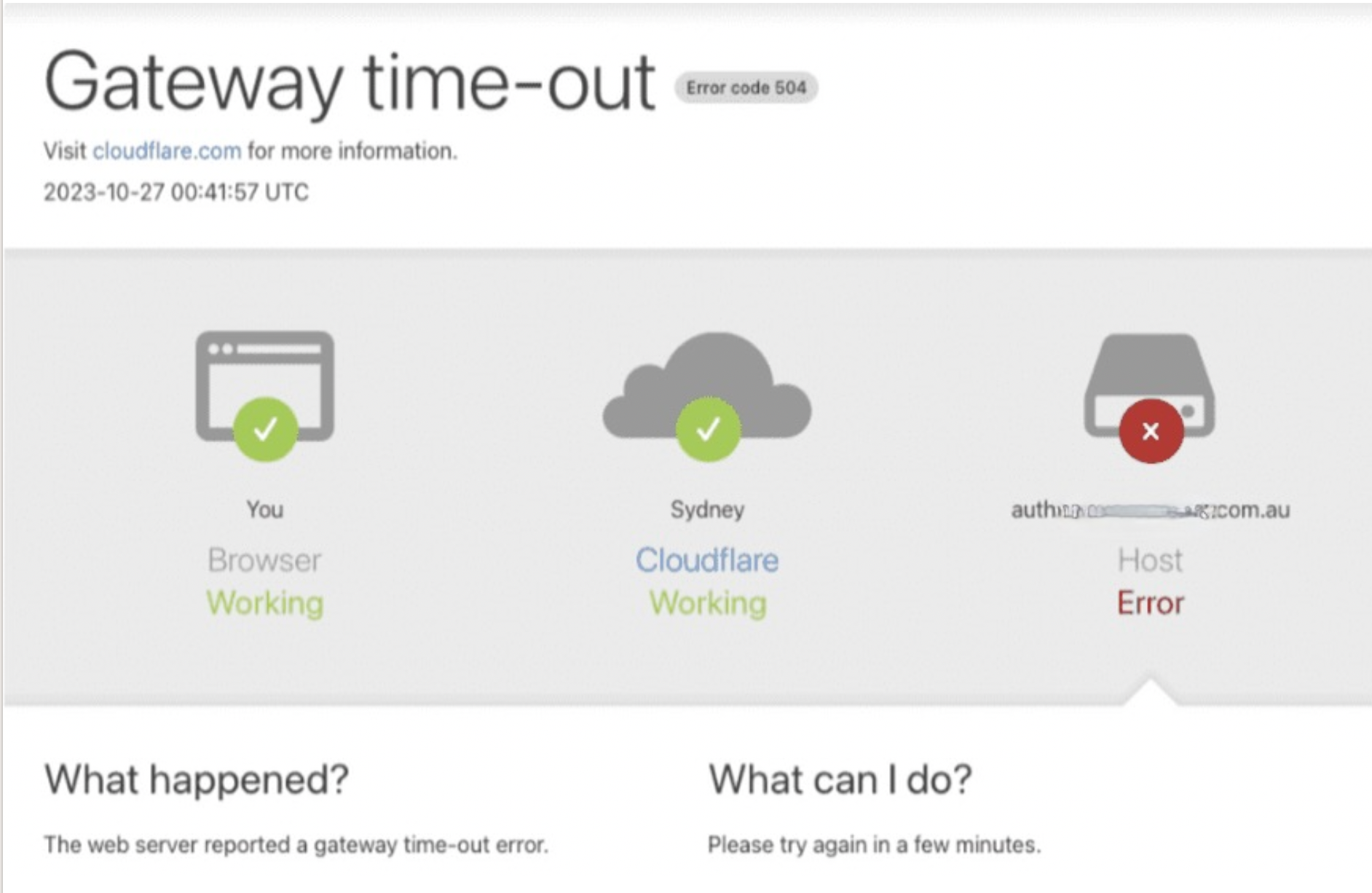
HTTP Status - 504 - Gateway timout
This error applies when there is a network connection issue or when the web server has not received a timely response from an upstream server that it needed to access to complete the request.
- URN code
- TBA
- Error to User
- Gateway timeout
- Screen displayed to user
- Please note that the screen below will only be displayed in production (not in the test environments)
Biza-Managed (BM) Responses and Error Mapping
These errors pertain to the Get User Principals adapter call (POST/user/principal).
HTTP Status - 200 - Success
This applies when a user receives and enters the correct OTP.
- Next action
- The user will be taken to Step 3 and see a list of principals to select from.
- Screen displayed

HTTP Status - 404 - Invalid Resource
- URN code
"urn:au-cds:error:cds-all:Resource/Invalid"
- Next Action
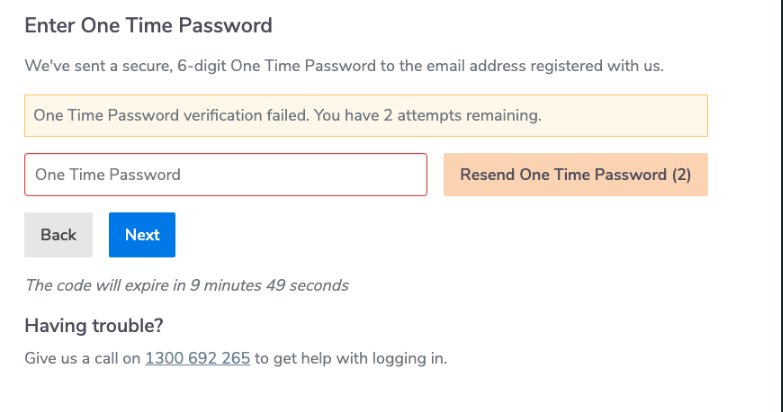
- OTP reentry prompt for three (3) retries.
- OAuth server error on the fourth (4th) incorrect OTP submission. User will be redirected back to Dashboard Login screen upon clicking "log Back In".
- Error to User
- Access_Denied. One Time Password verification failed. You have x attempts remaining.
- Screen displayed
HTTP Status - 429 - Too Many Requests
This is used for data adapter rate limiting to the HaaS platform.
- Next action
- OAuth server error. Redirect back to Dashboard Login screen upon clicking “Log Back In”.
- Error to user
- Server_Error
- Screen displayed to user
- coming soon
HTTP Status - 451 - Legal Block
This applies when the Data Holder is actively preventing a user from being authenticated for legal reasons. The status code indicates that the server is denying access to the resource as a consequence of a legal demand. Consumer account will be dropped from consumer selector page (i.e., ignore principal).
Please note that this generic 451 flag will be carried over to Step 3
- URN code
"urn:dio:error:cds-all:Resource/LegalBlock"
- Next Action
- User will be taken to profile selection page where there will be no principals available to select (see Step 3 for further information.)
- Error to user
- No error will be shown to the user - they will progress to the next step.
HTTP Status - 451 - Ineligible
This applies when the Data Holder is actively preventing a user from being authenticated as they are ineligible for CDR data sharing. Ineligible user flag set to true.
Please note that this generic 451 flag will be carried over to Step 3.
- URN code
urn:dio:error:cds-all:Resource/IneligibleBlock
- Next Action
- Goes to profile selection in Step 3 page where there will be no principals available to select (see Step 3 for further information).
- Error to user
- No error will be shown to the user - they will progress to the next step.
HTTP Status - 451 - Call Centre Block
This applies when the Data Holder is actively preventing user from being authenticated. The status code indicates that the customer should call the Call Center for further information.
Please note that this generic 451 flag will be carried over to Step 3.
- URN code
urn:dio:error:cds-all:Resource/CallCenterBlock
- Next Action
- Goes to profile selection in Step 3 page where there will be no principals available to select (see Step 3 for further information.)
- Error to user
- No error will be shown to the user - they will progress to the next step.
HTTP Status - 504 - Gateway timout
This error applies when there is a network connection issue or when the web server has not received a timely response from an upstream server that it needed to access to complete the request.
- URN code
- TBA
- Error to User
- Gateway timeout
- Screen displayed to user
- Please note that the screen below will only be displayed in production (not in the test environments)